A website for showcasing the product lineup, attracting B2B customers, and receiving supply inquiries
We created a Ukrainian-language catalog website for a company in the general wholesale trade sector.
The website helps organize a wide range of products, present product categories, display product specifications, and convert a corporate client’s interest into a price inquiry, consultation, or commercial proposal.
The project is optimized for mobile devices and can be further developed into a full-fledged B2B store with personalized pricing, partner accounts, inventory synchronization, documents, and integration with a CRM or accounting system.
Language of the first version: Ukrainian
Launch timeline: 14 days
Platform: WordPress + WooCommerce + Elementor
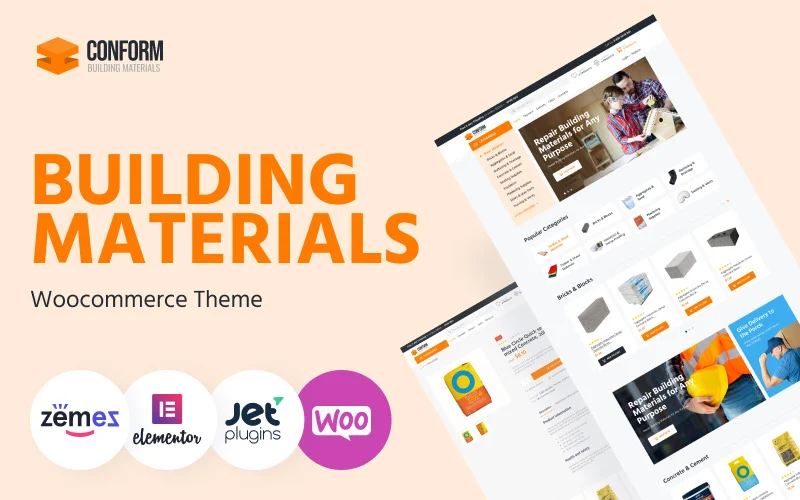
Design template: premium design from Template Monster Conform – Building Materials Website Templates WooCommerce Theme.
View Demo
Task
A wholesale supplier needed a website that would help:
- present the company in a professional manner;
- organize a large product range;
- Show product categories;
- post technical specifications;
- explain the terms of delivery;
- accept requests for calculations;
- work with corporate clients;
- display correctly on smartphones;
- lay the groundwork for SEO;
- run ads for specific categories;
- gradually expand the catalog;
- enable B2B features in the future.
It was important to quickly launch a functional foundation without spending a long time developing standard catalog elements from scratch.
Our Approach
To launch the site, we used a professional e-commerce platform designed for stores selling building materials, equipment, and technical products.
It was well-suited for businesses where the following are important:
- a large number of categories;
- product cards;
- technical specifications;
- request a quote;
- payment information;
- shipping terms;
- documentation;
- Working with corporate clients.
The template was used as both a technical and visual foundation.
The main focus was on:
- the directory structure;
- navigation;
- the structure of product pages;
- mobile optimization;
- request forms;
- SEO preparation;
- the ability to integrate with the company’s internal systems in the future.
Why Does a Wholesale Supplier Need Its Own Catalog Website?
Wholesale customers often find a supplier through:
- Google;
- recommendations;
- catalogs;
- exhibitions;
- tender platforms;
- partners;
- email;
- telephone inquiries;
- social media;
- direct sales.
Even if the initial contact did not take place through the website, a potential customer usually checks:
- what products the company supplies;
- Is this a necessary category?;
- which brands are represented;
- What are the product’s specifications?;
- Does the supplier do business with legal entities?;
- what documents are available;
- which regions are served;
- Is shipping available?;
- Is it possible to get a custom quote?;
- How to get a quote quickly.
A catalog website serves as a digital storefront and a tool to support the sales department.
A catalog website or a full-fledged online store
The wholesale business doesn’t always require the traditional model with transparent pricing and instant online payment.
Depending on the operating model, the website can function as:
Catalog
The customer browses the product selection and sends a request to the manager.
Catalog with a price inquiry
On the product page, instead of the usual “Buy” button, there is a button that says:
- Check the price;
- Request a quote;
- Add to request;
- Get advice.
Online store
The customer views the prices, adds items to the cart, and places an order.
Closed B2B Store
After logging in, the partner sees:
- its own prices;
- available balances;
- special conditions;
- order history;
- documents;
- personalized offers.
You can choose an initial model based on the company’s actual processes and gradually develop it.
Directory Structure
A logical classification of products is particularly important for a wholesale website.
Products can be categorized by:
- categories;
- subcategories;
- purpose;
- sectors;
- brands;
- technical specifications;
- materials;
- in terms of size;
- models;
- Terms of Use;
- availability;
- by customer type.
For example, the following may be presented separately:
- equipment;
- components;
- materials;
- tools;
- consumables;
- spare parts;
- professional solutions;
- installation supplies;
- related products;
- New Arrivals;
- Special offers.
The structure should align not only with the company’s internal accounting practices but also with how customers search for and compare products.
Search and Filter
In a large catalog, users shouldn’t have to manually browse through dozens of pages.
The website can be developed through:
- search by title;
- search by item number;
- type hints;
- filters;
- sorting;
- comparison;
- favorites lists;
- quick view;
- viewing history.
Filters can operate based on:
- brand;
- at the cost of;
- in size;
- capacity;
- material;
- compatibility;
- purpose;
- technical specifications;
- availability;
- country of origin.
A specific set of characteristics is determined separately for each product category.
Product Card
In a B2B catalog, a product listing should provide enough information to support an initial decision.
You can display the following in it:
- title;
- item number;
- photos;
- the price or the “Request” button;
- availability;
- minimum order quantity;
- brand;
- model;
- technical specifications;
- dimensions;
- material;
- compatibility;
- configuration;
- scope of application;
- operating conditions;
- warranty;
- delivery dates;
- certificates;
- instructions;
- drawings;
- PDF catalog;
- similar products;
- related products;
- the request form.
For technical products, it is especially important to avoid general descriptions and to highlight specific characteristics.
Request for a Commercial Proposal
For wholesale customers, it’s more convenient to submit a specific inquiry rather than just a general form.
A visitor can:
- Browse the catalog.
- Add the desired items to the list.
- Specify the quantity.
- Add a comment.
- Please provide your contact information.
- Send a request to the manager.
In the form, you can ask:
- company name;
- EDRPOU;
- contact person;
- phone;
- email;
- region;
- items needed;
- quantity;
- desired timeframe;
- shipping method;
- the need for documents;
- Comment.
This format helps managers gather more information even before the first call.
Wholesale Terms
On the website, it’s helpful to explain the following separately:
- who the company works with;
- minimum order;
- terms of the first delivery;
- payment procedure;
- the option to defer payment;
- shipping methods;
- regions of operation;
- delivery times;
- reservation rules;
- return policy;
- warranty service;
- Procedure for obtaining customized quotes.
It is not necessary to publish all commercial terms publicly.
Some information may be provided after registration or upon request.
Personalized Prices
In the wholesale business, the price may depend on:
- volume;
- customer category;
- frequency of orders;
- payment method;
- region;
- brand;
- contract terms;
- remnants;
- exchange rates;
- logistics.
Therefore, the website can be developed in several formats:
- public retail prices;
- estimated price;
- Price upon request;
- price after logging in;
- a customized price for a specific partner;
- Volume-based discount scale.
It is important that the pricing logic on the website aligns with the accounting system and the sales department’s operations.
B2B Client Dashboard
The next step in our development could be a partner dashboard.
In it, the customer can see:
- its own prices;
- product range;
- remnants;
- available discounts;
- order history;
- current order status;
- accounts;
- expense documents;
- contracts;
- certificates;
- repeat order;
- personal manager;
- Special offers.
This feature is useful if it truly simplifies recurring orders and is integrated with the company’s internal processes.
SEO Fundamentals for a Directory Website
For search engine optimization, it’s not enough to optimize just the home page.
Potential customers may be searching for:
- a specific type of equipment;
- model;
- item number;
- components;
- supplier;
- wholesale price;
- an authorized dealer;
- products from a specific brand;
- a product for a specific industry;
- equipment in a specific city;
- A technical solution tailored to a specific task.
Therefore, the website can be developed gradually through:
- categories;
- subcategories;
- brand pages;
- product cards;
- industry-specific solutions;
- application pages;
- pages for technical tasks;
- informational articles;
- comparison;
- instructions;
- answers to frequently asked questions;
- internal linking;
- external publications.
A large catalog can generate significant search potential if the page structure aligns with actual demand.
Brand Pages
If a company supplies products from several manufacturers, a separate page can be created for each brand.
It can be used to display:
- brief information about the manufacturer;
- product categories;
- available products;
- advantages;
- certification;
- warranty;
- scope of application;
- documents;
- supplier status;
- the request form.
Such pages can attract customers who are already looking for a specific brand or its official representative.
Industry Solutions
B2B customers are often looking not for a specific product, but for a solution for their industry.
You can create separate pages for:
- construction;
- manufacturing;
- warehouses;
- the agricultural sector;
- HoReCa;
- medical facilities;
- education;
- utility companies;
- offices;
- retail chains;
- government agencies;
- service companies.
The page can display:
- typical problems;
- Recommended categories;
- Examples of configurations;
- brands;
- documents;
- cases;
- decision request form.
This makes the website more useful for customers and supports B2B SEO.
Technical Documentation
For equipment and building materials, the customer may need:
- certificates;
- declarations;
- passports;
- instructions;
- technical charts;
- drawings;
- specifications;
- catalogs;
- warranty documents;
- files for designers;
- BIM models;
- Compatibility tables.
You can attach documents:
- in product listings;
- to brand pages;
- to a special section;
- to the partner’s office;
- to the knowledge base.
Convenient access to documents reduces the number of repeat requests to managers.
What the client received
- a Ukrainian-language website directory;
- mobile optimization;
- the WordPress content management system;
- the functional foundation of WooCommerce;
- the structure of product categories;
- product cards;
- the ability to add products on your own;
- the ability to edit descriptions and photos;
- payment and shipping pages;
- contact forms;
- a basis for price inquiries;
- the ability to upload technical documents;
- SEO preparation;
- readiness to launch the ad campaign;
- the ability to integrate analytics;
- a platform that can be further developed or handed over to another team.
Integration with CRM and Accounting Systems
As the catalog grows, it can be integrated with:
- CRM;
- ERP;
- warehouse inventory system;
- accounting software;
- delivery services;
- telephony;
- via corporate email;
- an electronic document management system;
- suppliers’ price lists;
- procurement system.
Synchronization is possible:
- prices;
- remnants;
- orders;
- customers;
- statuses;
- documents;
- personal discounts.
The specific integration depends on the capabilities of the external system and the available API.
Import of a wide range of products
If a catalog contains hundreds or thousands of items, adding products manually can be inefficient.
You can set up imports from:
- Excel;
- CSV;
- XML;
- supplier’s fee;
- accounting system;
- databases;
- API.
Before importing, it is important to agree on the following:
- category structure;
- names;
- specifications;
- units of measurement;
- items;
- photos;
- descriptions;
- options;
- availability;
- prices.
Unprepared imports can result in duplicates, weak pages, and a disorganized structure.
Payment and Shipping
Depending on the business model, the website can be connected to:
- online payments;
- non-cash payments;
- invoicing;
- payment upon approval;
- cash on delivery;
- delivery services;
- its own logistics;
- pickup;
- deliveries by shipping companies.
For a B2B client, it is important to explain:
- delivery regions;
- dates;
- free shipping terms;
- the ability to provide urgent delivery;
- acceptance criteria;
- handling of bulky goods;
- Document processing procedure.
Product feeds and third-party platforms
The catalog can be prepared for data transfer to:
- Google Merchant Center;
- advertising systems;
- marketplaces;
- bulletin boards;
- partner catalogs;
- industry platforms;
- procurement systems.
A feed may contain:
- title;
- item number;
- link;
- a photograph;
- price;
- availability;
- brand;
- category;
- Specifications.
This helps automate product listing and avoid having to manually update each platform.
The Role of Advertising
For a wholesale supplier, advertising can be used to:
- certain product categories;
- brands;
- equipment;
- shares;
- remnants;
- new areas;
- regions;
- requests for commercial proposals;
- recruiting dealers;
- search for partners.
It’s better to target ads not only to the home page, but also to specific categories, brands, or industry solutions.
This helps us respond more accurately to customer inquiries and improve the quality of our customer service.
The Role of Content
For technical and wholesale businesses, content can help:
- explain the choice;
- compare solutions;
- demonstrate usage;
- drive SEO traffic;
- support managers;
- respond to objections;
- train partners;
- reduce the number of frequently asked questions.
These may include:
- inspections;
- instructions;
- comparison;
- technical articles;
- cases;
- diagrams;
- calculators;
- tables;
- checklists;
- webinars;
- video;
- presentations;
- Answers to frequently asked questions.
A single piece of content can be used on the website, in email newsletters, on social media, and by the sales department.
Sales Department Support
A directory website can help managers:
- send clients the correct pages;
- create collections;
- display specifications;
- submit documents;
- answer frequently asked questions;
- demonstrate alternatives;
- collect requests;
- record the source of the inquiry;
- reduce the time it takes to prepare a proposal.
Instead of sending a large number of files, the manager can provide a link to the current product, brand, or solution page.
How to Further Develop the Website
The next steps could be:
- expanding the catalog;
- importing a product line;
- filters;
- search by item number;
- brand pages;
- industry-specific solutions;
- technical documentation;
- request for a commercial proposal;
- shopping cart;
- personalized prices;
- personal account;
- B2B registration;
- online payment;
- synchronization of prices and inventory levels;
- integration with CRM;
- integration with ERP;
- automatic invoice generation;
- electronic document management;
- product feeds;
- marketplaces;
- multilingualism;
- international sales;
- SEO;
- Google Ads;
- remarketing;
- email marketing;
- Affiliate section.
The specific direction of development depends on the size of the catalog, the pricing model, and the supplier’s internal processes.
How the customer saves money in the future
Using a professional e-commerce platform allowed us to avoid spending time and money on creating standard catalog elements from scratch.
The customer saves:
- time required for the initial startup;
- budget for basic development;
- costs associated with mobile adaptation;
- time to create new categories;
- funds for a complete overhaul in connection with the expansion of the product line;
- expenses for individual websites for various product categories;
- the time managers spend resending information;
- a budget for future SEO thanks to a scalable structure;
- the costs associated with a closed platform that is difficult to integrate or transfer to another team.
The website can grow gradually along with the number of products, brands, partners, and delivery regions.
Why We Chose a Premium Design
Supplier directory websites have many common elements:
- catalog;
- categories;
- product cards;
- search;
- filters;
- payment information;
- shipping terms;
- documents;
- request forms;
- contact blocks;
- mobile version.
Building all of these elements from scratch would increase the timeline and budget, but it wouldn’t necessarily yield better results for the business.
This professional foundation allowed us to get straight to the point:
- product mix structure;
- catalog content;
- attracting B2B clients;
- sales support;
- SEO;
- advertisements;
- further automation.
Order Promotion strategy for a wholesale online store
Do you need a product catalog website for a wholesale supplier?
Site 4 biz Build creates websites and directories for:
- wholesale companies;
- equipment suppliers;
- distributors;
- importers;
- manufacturers;
- sellers of building materials;
- technology companies;
- B2B stores;
- trading companies;
- companies with a wide selection.
We can help:
- create a new catalog website;
- replace the outdated one;
- organize a smooth move;
- develop a product mix structure;
- import goods;
- configure filters;
- create data sheets with technical specifications;
- Submit a request for a commercial proposal;
- connect the CRM;
- synchronize prices and inventory levels;
- create a B2B client’s personal account;
- set up analytics;
- improve SEO;
- launch an ad;
- Combine the catalog, sales, documents, and analytics into a single system.
Write about your projectgoals, available resources, and we will help you achieve them.