A website designed to showcase a digital product, its features, and attract users
We created a Ukrainian-language website for an online service in the information technology sector.
A website helps clearly present a digital product, explain how it works, highlight its benefits for users, and convert visitor interest into a sign-up, a request, a consultation, or another desired action.
The project is optimized for mobile devices and can be further developed through dedicated feature pages, solutions for different audiences, a knowledge base, a personal account, integrations, SEO, advertising, and content.
Language of the first version: Ukrainian
Launch timeframe: 7 days
Platform: WordPress + Elementor
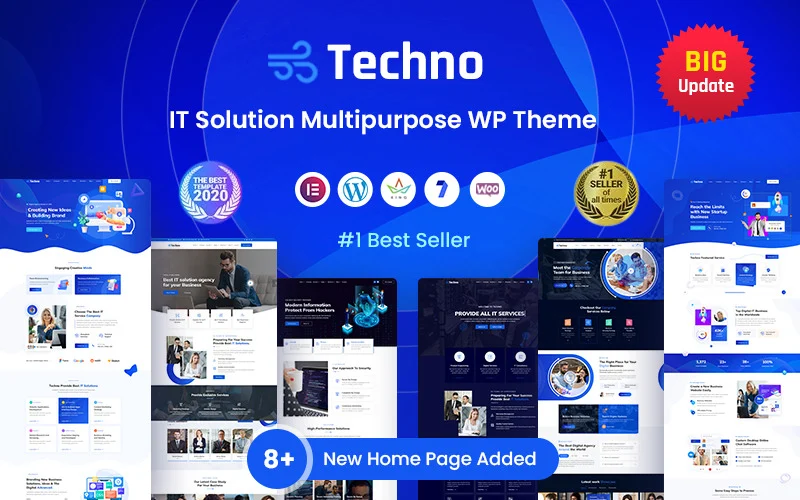
Design template: premium design from Template Monster Techno – Technology IT Solutions & Business Consultant WordPress Theme.
View Demo
Task
The online service needed a website that would help:
- present a digital product professionally;
- explain what problem the service solves;
- demonstrate the main features;
- demonstrate the benefits for different types of users;
- build trust in the technological solution;
- simplify registration or the application process;
- work properly on smartphones;
- lay the groundwork for launching an ad campaign;
- prepare the website for SEO promotion;
- gradually add new features, pricing plans, and destinations.
It was important to quickly launch a professional presentation framework without having to spend a long time developing standard technology modules from scratch.
Our Approach
For this project, we used a premium design framework created for IT companies, technology products, and digital services.
This allowed us to focus not on creating standard elements from scratch, but on more important tasks:
- defining the value of the service;
- explanation of the use case;
- page structure;
- feature presentations;
- trust blocks;
- mobile optimization;
- calls to action;
- potential for future scalability.
The template was used as a visual and technical foundation that can be adapted to a specific digital product, its brand, audience, and business model.
Why Does an Online Service Need Its Own Website?
A digital product may include a personal account, a mobile app, or an internal system.
But a potential user still needs a resource where they can understand:
- What kind of service is this?;
- what problem it solves;
- Who is it suitable for?;
- how it works;
- which has the following functions;
- how much does it cost;
- Is it safe to use?;
- how to register;
- where to get support;
- How the service differs from its alternatives.
The website serves as the presentation and marketing component of the digital product.
You can direct users to it from:
- Google;
- Google Ads;
- social media;
- partner resources;
- email;
- software catalogs;
- PR articles;
- presentations;
- performances;
- recommendations;
- mobile app stores.
A website should explain the benefits, not the technology
It’s not enough for a user to simply look at a list of technical specifications.
It’s important for him to understand:
- what tasks the service simplifies;
- which helps automate;
- how much time it saves;
- what errors it reduces;
- what data it helps monitor;
- what will change after the connection is established;
- How difficult is it to get started?
Therefore, it makes sense to structure an online service page according to the following logic:
- The user’s problem.
- Solution.
- How the service works.
- Main Features.
- Result for the user.
- Evidence of trust.
- Rate plan or access format.
- Registration or application.
This approach helps make a complex digital product understandable even to someone without a technical background.
A structure tailored to different audiences
An online service can be useful to several groups of users.
For example:
- private specialists;
- small businesses;
- corporate clients;
- managers;
- marketers;
- accountants;
- managers;
- to our partners;
- developers;
- government or non-governmental organizations.
Each audience may have:
- various tasks;
- varying levels of training;
- various selection criteria;
- various objections;
- Various use cases.
Therefore, the website can be expanded by adding individual pages under:
- types of customers;
- industries;
- functions;
- business objectives;
- use cases;
- rates;
- integration;
- affiliate programs;
- corporate implementation.
How to Present the Service’s Features
Don’t limit yourself to the general list of options.
Each important function can be explained based on its structure:
What does the function do?
A brief and clear explanation.
What problem does it solve?
Why users need it.
How It Works
The basic steps, without getting bogged down in technical details.
What the user gets
A specific result, a report, automation, data, or time savings.
Who can benefit most from it
User type or business scenario.
Next step
Try it out, sign up, request a demo, or ask a question.
Individual feature pages can simultaneously support sales, SEO, advertising, and customer support.
Service Workflow
For a digital product, it’s helpful to show a simple step-by-step guide on how to use it.
For example:
- The user is registering.
- Adds the necessary data.
- Configures the service.
- Starts a check, a process, or an automation task.
- Gets the result.
- Uses recommendations or data in their work.
This section helps reduce the feeling that it’s difficult.
It can be supplemented with:
- screenshots;
- a short video;
- animation;
- a demonstration of the interface;
- an example of the result;
- trial access;
- an interactive tour.
SEO Basics for an Online Service
Potential users may search for more than just the product name.
They can submit requests regarding:
- a specific problem;
- process automation;
- data verification;
- online tool;
- a program for a specific task;
- business service;
- an alternative to manual labor;
- comparison of solutions;
- free tool;
- mobile app;
- SaaS service;
- integration with another system.
Therefore, the website can be developed gradually through:
- function pages;
- pages dedicated to user issues;
- pages tailored to different types of customers;
- pages by industry;
- integration pages;
- comparison with alternatives;
- instructions;
- knowledge base;
- answers to frequently asked questions;
- blog;
- cases;
- rate pages;
- internal linking;
- external publications.
This helps attract people who aren’t yet familiar with the service’s name but are already looking for a way to solve a specific problem.
What the client received
- the Ukrainian-language website of the online service;
- mobile optimization;
- a modern, technologically advanced design framework;
- the WordPress content management system;
- the ability to edit text and images on your own;
- a framework for presenting a digital product;
- a structure for describing functions;
- the ability to add new pages;
- contact forms;
- the option to enable registration;
- a template for the rates page;
- the ability to blog;
- SEO preparation;
- readiness to launch the ad campaign;
- the ability to integrate analytics;
- a platform that can be further developed or handed over to another team.
Trust Badges for an Online Service
Before registering, users can evaluate:
- who created the product;
- Is it a real company?;
- how the data is processed;
- Is the connection secure?;
- Is there support?;
- How often is the service updated?;
- Are there any reviews?;
- people who are already using the product;
- Are the terms clear?;
- how to unsubscribe;
- Is it possible to export the data?;
- Does the service operate reliably?;
- Is there any documentation?
You can post the following on the website:
- information about the team;
- privacy policy;
- Terms of Use;
- safety description;
- client logos;
- reviews;
- cases;
- statistics;
- answers to frequently asked questions;
- support contacts;
- service status;
- information about updates.
Pricing and Business Model
A website can be developed using various monetization models:
- free access;
- trial period;
- freemium;
- monthly subscription;
- annual subscription;
- usage-based payment;
- payment based on the number of inspections;
- pricing based on the number of users;
- corporate rate;
- custom implementation;
- affiliate model;
- white label.
For each plan, it is important to show:
- Who is it for?;
- included;
- What are the limits?;
- what features are available;
- how payment is made;
- Can I change my rate plan?;
- what will happen once the subscription ends.
If the model is still being tested, the website may initially direct users not to a payment page, but to a registration page, a sign-up form, or a demo.
Registration and Targeted Action
For various digital products, the main action may be:
- sign up;
- Try it for free;
- download the app;
- Request a demo;
- get advice;
- join the waiting list;
- create an account;
- verify the data;
- calculate the result;
- Request a corporate quote.
The main call to action should be clear and repeated in the key sections of the page.
Before launching an ad campaign, it’s important to set up tracking:
- pressing buttons;
- steps leading to registration;
- creating accounts;
- completion of onboarding;
- demonstration requests;
- payments;
- reuse.
User Onboarding
Registration does not necessarily mean that a person has started using the product.
Therefore, the website and the service itself can support users through:
- a brief instruction;
- step-by-step setup;
- tips;
- sample data;
- startup checklist;
- email message;
- video tutorials;
- knowledge base;
- consultation;
- Support Chat.
To grow the service, it’s important to analyze not only the number of sign-ups, but also how many users completed a key action and received their first value.
Knowledge Base and Support
As the product develops, the website can be expanded to include:
- documentation;
- instructions;
- video tutorials;
- answers to frequently asked questions;
- descriptions of integrations;
- the updates page;
- the form of the request;
- searching the knowledge base;
- the request system;
- status page.
This helps reduce the number of repetitive support requests and makes it easier to onboarding new users.
Integrations
It is important for an online service to show which systems it can interact with.
These may include:
- CRM;
- analytics systems;
- payment services;
- mail services;
- messaging apps;
- Google services;
- advertising platforms;
- accounting systems;
- marketplaces;
- APIs for other products;
- automation services.
For each important integration, you can create a separate page with an explanation:
- that goes well with;
- what data is transmitted;
- that is being automated;
- Who can benefit from this;
- How to connect.
These pages can also attract search traffic.
Mobile app
If an online service has a mobile app, the website can serve as a page to showcase it.
You can place the following on it:
- Key features;
- screenshots;
- video;
- advantages;
- instructions;
- answers to questions;
- links to app stores;
- form of support;
- privacy policy;
- the updates page.
You can create separate pages for app features and specific user tasks.
The Role of Content
Content for an online service can help:
- explain the problem;
- train users;
- attract search traffic;
- give examples;
- compare approaches;
- support sales;
- reduce the burden on support;
- retain users;
- announce new features.
These may include:
- instructions;
- let’s go;
- checklists;
- inspections;
- comparison;
- cases;
- research;
- video;
- webinars;
- update pages;
- templates;
- useful tools;
- Answers to frequently asked questions.
A single piece of content can be adapted for use on a website, in emails, on social media, in advertisements, and for customer support.
The Role of Advertising
For an online service, advertising can be used to:
- invitation to participate in the beta program;
- registrations;
- downloading the app;
- review of the new offer;
- reaching a new audience;
- user retention;
- promotion of specific features;
- corporate demonstrations;
- collection of applications.
It’s important to run ads not only on the home page, but also on specific landing pages for:
- a specific problem;
- function;
- audience;
- industry;
- integration;
- a special offer.
Digital Product Analytics
For an online service, it’s important to measure more than just website traffic.
The following indicators may be useful:
- Go to registration;
- accounts created;
- Onboarding completed;
- use of a key function;
- user retention;
- requests for demonstrations;
- upgrade to a paid plan;
- rejections;
- unsubscribing;
- sources of active users;
- cost of acquisition;
- long-term customer value.
To do this, the website can be integrated with product analytics, CRM, a payment system, and advertising dashboards.
How to Further Develop the Website
The next steps could be:
- individual function pages;
- pages for different audiences;
- industry-specific solutions;
- integration pages;
- rates;
- online payment;
- registration;
- personal account;
- trial access;
- demo version;
- interactive tour;
- knowledge base;
- documentation;
- video tutorials;
- support chat;
- Updates page;
- status page;
- affiliate program;
- API documentation;
- multilingualism;
- international promotion;
- SEO;
- Google Ads;
- Meta Ads;
- remarketing;
- email automation;
- PR;
- software catalogs;
- promotion of a mobile app.
The specific direction of development depends on the product stage, business model, and existing technological infrastructure.
How the customer saves money in the future
Using a professional, technology-based design framework allowed us to avoid spending time and money on creating standard presentation blocks from scratch.
The customer saves:
- time required for the initial startup;
- budget for the basic design;
- costs associated with mobile adaptation;
- time spent creating new pages;
- funds for a complete overhaul when adding a new feature;
- costs for specific websites targeting different audiences;
- the time it takes to find a developer for routine updates;
- a budget for future SEO thanks to the ability to expand the structure;
- the costs associated with a closed platform that is difficult to maintain or transfer to another team.
The website can evolve gradually along with the product, the team, and the number of users.
Why We Chose a Premium Design
Online service websites have many common elements:
- the main clause;
- function blocks;
- work plan;
- advantages;
- rates;
- integration;
- reviews;
- cases;
- forms;
- calls to register;
- blog;
- contact blocks;
- mobile version.
Building all of these elements from scratch would increase the timeline and budget, but it wouldn’t necessarily help us gauge demand more quickly.
This professional foundation allowed us to get straight to the point:
- formulation of values;
- feature presentations;
- attracting early adopters;
- ad testing;
- product development.
Order Online service promotion strategy
Do you need a website for an online service or an IT product?
Site 4 biz Build creates websites for:
- online services;
- SaaS products;
- mobile apps;
- IT companies;
- startups;
- automation platforms;
- fintech projects;
- AI services;
- digital tools;
- enterprise software;
- additional digital business areas.
We can help:
- create a new website;
- launch a landing page to gauge demand;
- present the service’s features;
- create pages for different audiences;
- add rates;
- enable registration;
- set up analytics;
- create a knowledge base;
- prepare the integration pages;
- improve SEO;
- launch an ad;
- Combine the website, content, email, advertising, and product analytics into a single user engagement system.
Write about your projectgoals, available resources, and we will help you achieve them.